Props · 3 min read
How to make a .ytyp for your FiveM props (prop not spawning fix)
Read in: Español · Français · Deutsch · Português · Italiano · Polski · Türkçe · Русский
You put a .ydr and its .ytd in a resource's stream folder, start it, call CreateObject with the prop's name, and nothing appears. The files stream fine, but to spawn a model as an object by its name, the game wants an archetype for it. Archetypes live in a .ytyp.
What a .ytyp is
A .ytyp is a list of archetypes, one per model. Each one tells the game:
- its name (the model's, the one you spawn),
- its bounding box and sphere, used to decide when it is on screen,
- its LOD distance: how far away it is still drawn,
- its texture dictionary: the
.ytdits textures are in, - its physics dictionary: where its collision is,
- its flags: static or dynamic, and more.
The archetype's LOD distance is not the same as the model's own LOD switch distances: the first says how far the prop is drawn at all, the second when the model swaps to a lighter version of itself.
A .ytyp is only read if the fxmanifest asks for it:
fx_version 'cerulean'
game 'gta5'

data_file 'DLC_ITYP_REQUEST' 'stream/my_props.ytyp'
Forgetting this line is one of the most common reasons a prop with a .ytyp still will not spawn.
Make one for the props you have
Prop to YTYP writes a .ytyp for .ydr and .yft files you already have:
- Drop your props with their
.ytdfiles. A.ytdnamed like a prop is used for that prop. - Check the table: each prop's size, its textures (a warning when it has none: drop its
.ytd) and its collision. - Name the
.ytyp; that name is also the resource's. Tick Static (can't be pushed) if the props should never move, and set Seen up to under Advanced (100 m by default). - Click Download the FiveM resource (.zip): a folder with the fxmanifest (its
DLC_ITYP_REQUESTline included), the.ytypand your files instream/. ensureit on your server, then use Copy spawn code to try it.
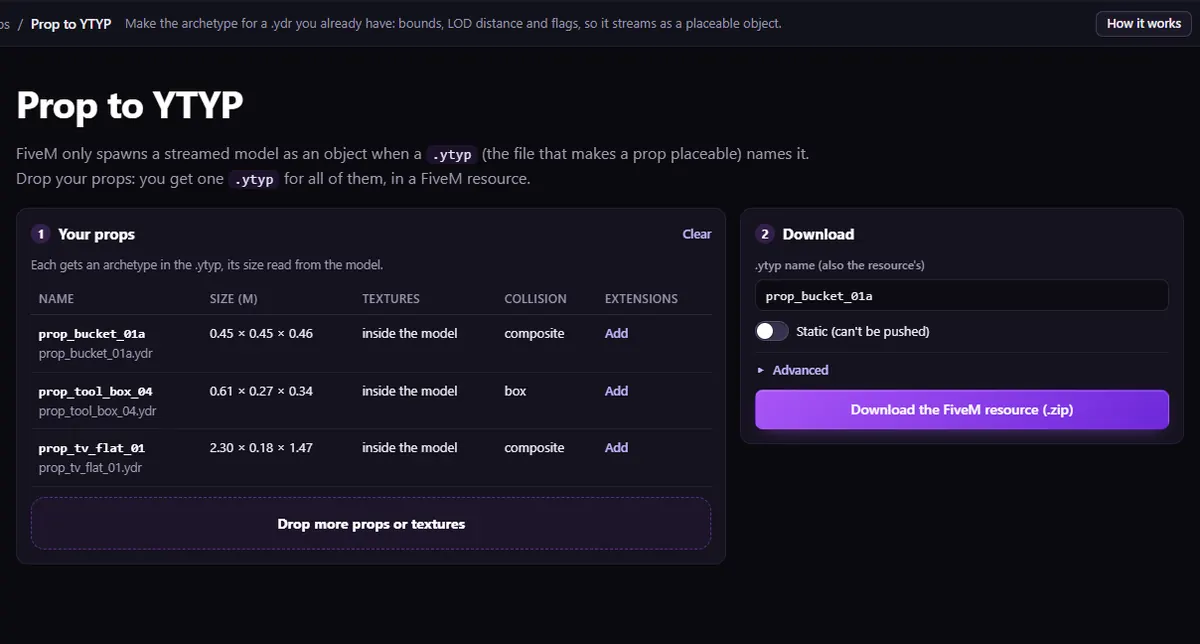
The archetype's name is the file's name. Rename your files before you drop them, and never give them the name of one of the game's props: two models with the same name clash.
Each archetype gets the model's own bounding box, its texture dictionary (the matching .ytd, or none when the textures are inside the model) and its own name as physics dictionary, so the collision inside the model is used. A prop with no collision is flagged in the table: Prop to YTYP does not make one. For that, see why players walk through a prop.
Change a .ytyp you already have
To change an existing .ytyp (a draw distance, a texture dictionary, a flag), open it in the YTYP Editor: every archetype with its distances, dictionaries, flags explained one by one, bounds and extensions such as ladders or seats.
The Prop to YTYP video shows the whole thing.
Questions
- My prop has a .ytyp but is white in game. Why?
- Its archetype's texture dictionary does not name the
.ytdits textures are in. See why FiveM textures are white or purple. - Can one .ytyp hold many props?
- Yes. Prop to YTYP makes one
.ytypfor all the props you drop, and onedata_fileline loads it. - I changed the .ytd but see the old textures. Why?
- Players keep the
.ytdthey downloaded until they reconnect. Rejoin the server instead of only restarting the resource.
The tool for this
Prop to YTYP
Drop your .ydr or .yft props with their .ytd: check their sizes and textures, and download a FiveM resource with one .ytyp that makes them placeable.
Open Prop to YTYPAlso useful here: YTYP Editor · Prop Collision Editor