Textures, files & packs · 4 min read
Why are my FiveM textures pink, purple or white? (And how to fix it)
Read in: Español · Français · Deutsch · Português · Italiano · Polski · Türkçe · Русский
Your new prop, car or MLO streams in, but part of it is plain white, or a loud pink or purple. The model itself loaded fine: what is missing is one of its textures. The game looked for it, found it nowhere, and drew that part without it.
The fix is almost never to clear your cache or reinstall the resource. It is to find which texture is missing and why the model cannot see it. Here is where the game looks, the mistakes that break it, and how to find the culprit without opening every file in OpenIV.
Where the game looks for a texture
A model does not carry a list of files. Each part of it (each shader) names the textures it needs, and the game looks for each name in this order:
- Inside the model itself. A
.ydror.yftcan hold its own textures (embedded). - The texture dictionary its archetype names. For a prop or a map model that is the
textureDictionaryof its entry in the.ytyp, which is not always a.ytdwith the model's name. For a car it is thetxdNameinvehicles.meta. - That dictionary's parents, set in a
gtxd.meta(CMapParentTxds), one after another up the chain. - The game's own shared dictionaries that are always loaded, such as
vehshare(car glass, wheels and paint) andmapdetail.
A texture that is in none of these places is the white, pink or purple part. So the question is never just "is the texture in my resource?" but "is it somewhere this model looks?".
The usual causes
- The
.ytdis not the one the.ytypnames. Renaming the.ytdto match the model is a common guess, but what counts is the archetype's texture dictionary. - The
.ytdis not in the resource at all, or not in itsstreamfolder, and the game does not have one of that name either. - The texture is in another
.ytdof the same resource, one this model never looks in: a shared dictionary with no parent link to it. - The
gtxd.metais there, but the fxmanifest does not load it. Without itsdata_fileline the game never sees those parents. - A car's
txdNameinvehicles.metadoes not match its.ytd.
There is one more case that can look the same but is not a missing texture: a texture saved without mipmaps. A customer's addon ped was pink up close in game with every texture in place, and its textures had no mipmaps. That case has its own guide: how to add mipmaps to a YTD.
Find the missing texture in a minute
Missing Textures Check follows the same lookup for every model in a resource. It is free (you sign in with Discord) and only reads: it changes nothing.
- Drop your FiveM resource, its folder or its
.zip, with its.ytyp,vehicles.metaandgtxd.metaif it has them. - Read Totals: Missing is the number of textures that draw white or purple; From the game are textures only the game's dictionaries have, which is fine.
- Open a model's card. Its table lists every texture with its slot and where it was found: in the model, its
.ytd, a parent.ytd, the game, or Missing. - When a missing texture is somewhere else in your drop, the table says so under its name ("Is in X, where this model doesn't look."), and the hint under the model says how to fix it.
- Keep Only problems ticked to see just the broken models, and download the report as a
.csvif you want to work through it.
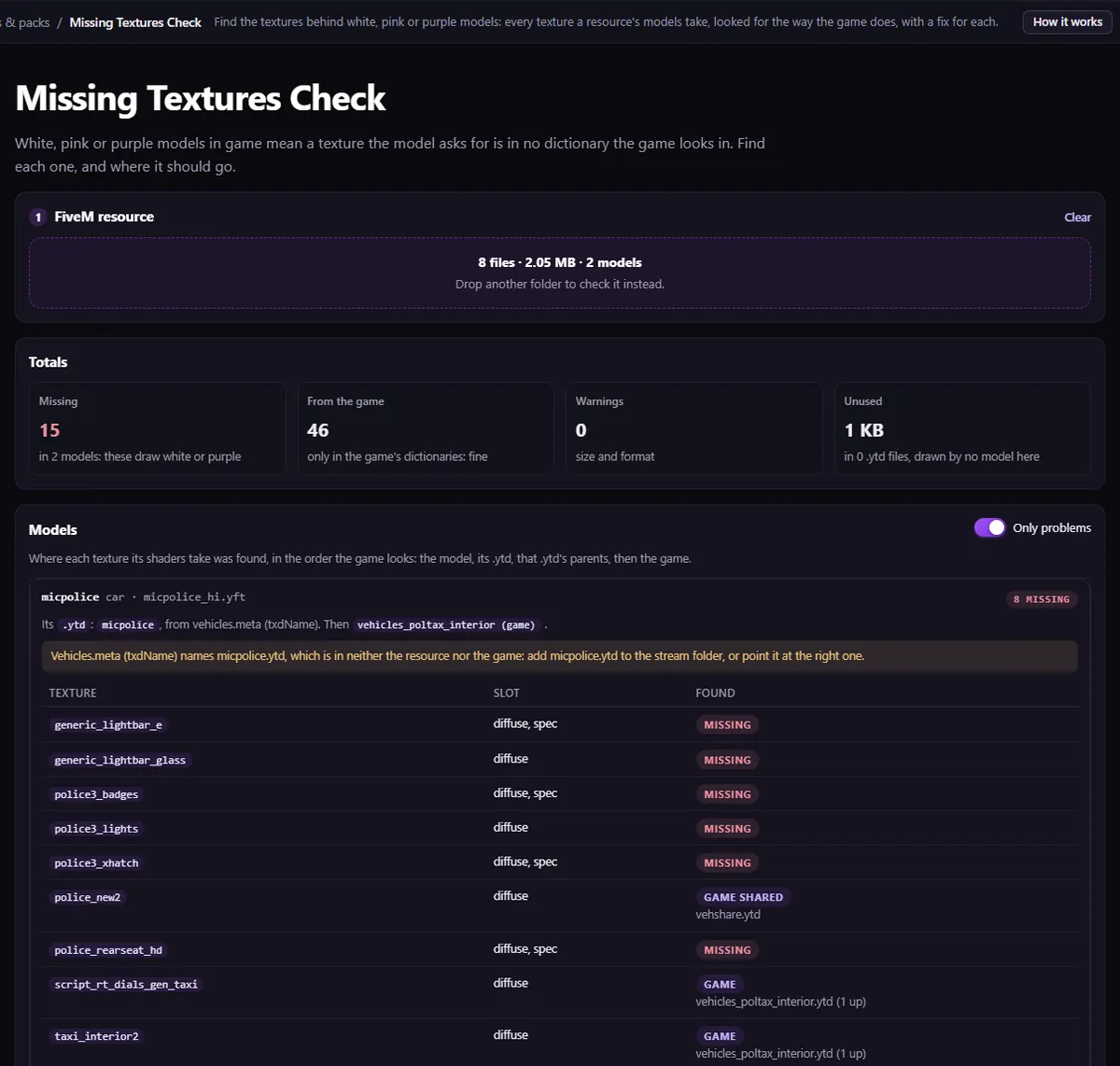
.ytd taken out: 15 textures found nowhere, and the hint naming the dictionary its vehicles.meta asks for.Fix each cause
The texture really is missing
Put it into the dictionary the model uses. Texture Editor opens the .ytd and adds one: Add a texture, give it the exact name the model asks for, pick its kind (colour, normal or specular map) and the picture, then download the .ytd. It comes back compressed, with mipmaps.
The model looks in the wrong dictionary
Change the archetype's texture dictionary in the .ytyp with the YTYP Editor, so it names the .ytd that has the textures. For a car, fix txdName in vehicles.meta.
The texture is in another .ytd
Move it into the model's own .ytd, or make that other .ytd a parent of it in a gtxd.meta. Texture Dedupe writes one for you when it shares textures between dictionaries. Either way the fxmanifest has to load it:
files { 'gtxd.meta' }
data_file 'GTXD_PARENTING_DATA' 'gtxd.meta'
Pink or blurry only up close
Look at Size and format in the same report. Textures listed under no mipmaps can be rebuilt in one go with the Asset Optimizer.
Then reconnect, not just restart
Players keep the .ytd they already downloaded until they reconnect: restarting the resource is not enough to see a fixed texture. After a fix, drop the resource into the check again, then rejoin the server to look at it in game.
Questions
- Does clearing the FiveM cache fix white or purple textures?
- Not when a texture is missing from the resource: the cache cannot add a texture nobody sends. Find the missing one first. After you change a
.ytd, though, players do need to reconnect to get the new one. - Why is only part of my model white?
- Each part of a model has its own textures. Only the parts whose textures were found nowhere are drawn without them, so a car can have perfect paint and white seats.
- Can a texture come from the game instead of my resource?
- Yes. A model can use textures from the game's own dictionaries, such as
vehsharefor car glass and wheels. Missing Textures Check shows those as From the game or Game shared, not as missing.
The tool for this
Missing Textures Check
Drop your resource and see every model's textures, where each one was found, and a fix for each one found nowhere.
Open Missing Textures CheckAlso useful here: Texture Editor · Asset Optimizer