Vehicles · 3 min read
Addon cars popping in or killing FPS? Add LODs to your FiveM car
Read in: Español · Français · Deutsch · Português · Italiano · Polski · Türkçe · Русский
A street with ten addon cars parked on it, and the frame rate drops. Cars pop in late, or look the same from 200 m as from 2 m. A common reason: the cars have only their full-detail model, so every triangle of it is drawn even when the car is far away.
How the game's cars do it
Almost every vehicle in the game (542 of 544) has four levels of detail (LODs) in its .yft: High, Medium, Low and Very low, each a lighter version of the car. In the middle of the range, Medium has about half of High's triangles, Low under a quarter and Very low 4 %. The Adder's are 14,782, 6,149, 1,643 and 351.
The far ones leave out what you cannot see from there: most Mediums have no dashboard dials, many no steering wheel, and Very low is little more than the shell with its lights. The wheels have their own High, Medium and Low. Which LOD is drawn at what distance is set by lodDistances in vehicles.meta.
Many addon cars come with only High (and High-only wheels). A car of 60,000 triangles then has no lighter version to fall back on far away.
Check a car, then add its LODs
Drop the car into the Vehicle LOD Builder: its .yft with its _hi.yft and .ytd, or the whole resource folder (or its .zip) with its vehicles.meta.
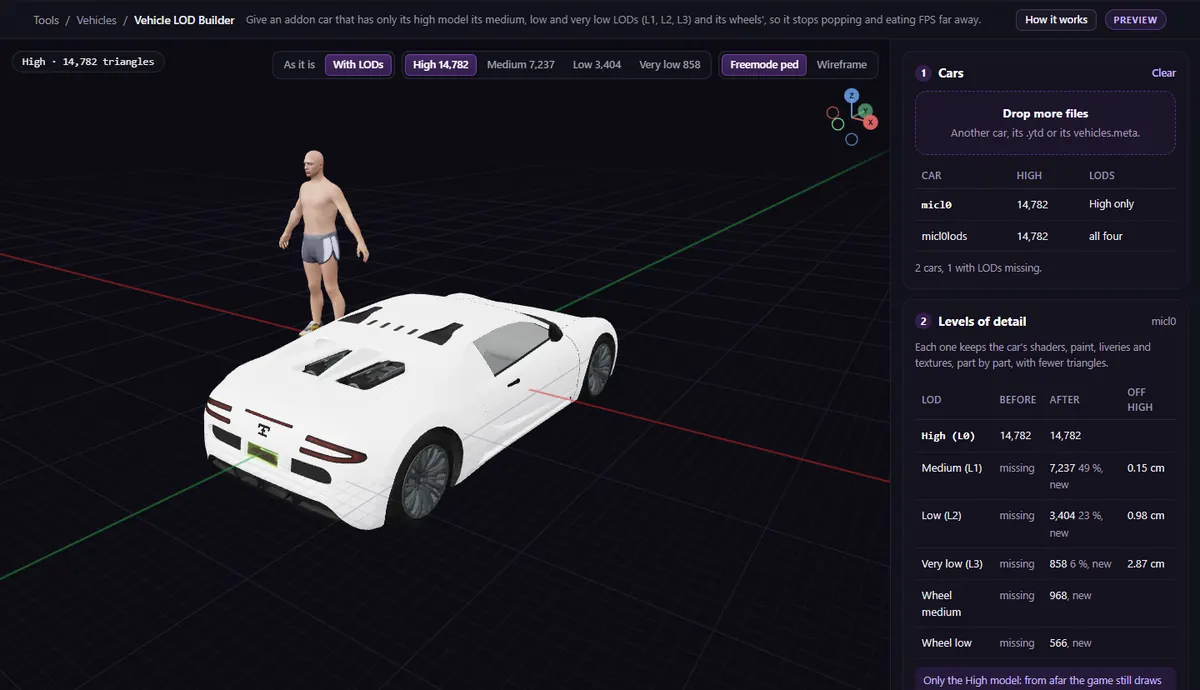
- The Cars table (for a pack), or Levels of detail for one car, says what each car has: High only, some missing, or all four.
- Under Levels of detail, keep All three (Medium, Low and Very low) and the default ticks: the wheels' Medium and Low too, and leave out what Rockstar's far LODs leave out (dials, steering wheel, hubs, suspension, engine, parts under 2 pixels).
- Compare As it is and With LODs in 3D, one LOD at a time, with each one's triangle count and how far its shape is from High.
- Under Seen from afar, slide the distance to see which LOD the game draws there, from the car's own
lodDistances. - Download the
.yftand put it in place of the old one instream/. The_hi.yftand.ytdstay as they are.
Under Advanced, the share of High each LOD aims for starts at Rockstar's own (49, 23 and 4 %), with a cap on triangles for each. A LOD that would not save at least 15 % of the one above it is not made.
The report and the 3D preview of each LOD are free; downloading the car with its LODs is a Creator plan function, and a whole pack at once is Studio's batch mode.
What it does not do
- It does not change High: the car up close looks exactly as before.
- It does not write
lodDistancesintovehicles.meta. - Tuning parts (
_modfiles) get no LODs. - Textures are not touched: the LODs share the car's
.ytd. For heavy textures, see the oversized asset warning.
Questions
- Will LODs fix texture loss?
- Not on their own: texture loss is about texture memory, which LODs do not change. They lower what each car costs to draw. For texture loss, start with Server Budget.
- Does it change the car up close?
- No. High is kept as it is; only the lower levels are added.
The tool for this
Vehicle LOD Builder
Drop your car or pack: see what LODs it has, build its Medium, Low and Very low ones, and check each in 3D before you download.
Open Vehicle LOD BuilderAlso useful here: Server Budget