Textures, files & packs · 3 min read
FiveM texture loss: why the city goes blurry and how to fix it
Read in: Español · Français · Deutsch · Português · Italiano · Polski · Türkçe · Русский
Players drive into the city and the roads are blurry, buildings stay grey for seconds, sometimes textures never load at all. FiveM players call it texture loss, or the "city bug". When it only happens on your server, the cause is usually what your server streams.
What texture loss is
Everything your server streams (cars, clothing, props, maps) shares the memory the game has for textures with the game's own city. When what a player has to load around them does not fit, textures arrive late, blurry or not at all.
FiveM itself points at the worst offenders. Any streamed file over 16 MiB of memory gets a warning in the server console, and from 48 MiB the warning says it plainly: "Oversized assets can and WILL lead to streaming issues (such as models not loading/rendering)." (What that warning measures.)
The usual causes on a server:
- Oversized files: 4K car and clothing textures, a whole pack crammed into one
.ytd. - The same file streamed by two resources: the game only gets one of them, and you pay to stream the other.
- The same textures repeated across a pack's dictionaries: every copy is streamed.
- Textures without mipmaps: the game has no smaller level of them to fall back on, so they cost their full size at any distance.
If a player gets texture loss on every server they join, the problem is on their side (their settings or their PC), not in your resources.
Step 1: see what your server streams
Drop your whole resources folder into Server Budget. It reads every streamed file's header in your browser, so nothing is uploaded and it is free without signing in. You get:
- Graphics memory and System memory for everything you stream.
- By resource, sorted by memory: the resources to look at first.
- Oversized: every file over 16 MiB of graphics memory.
- Streamed by more than one resource: keep one copy of each.
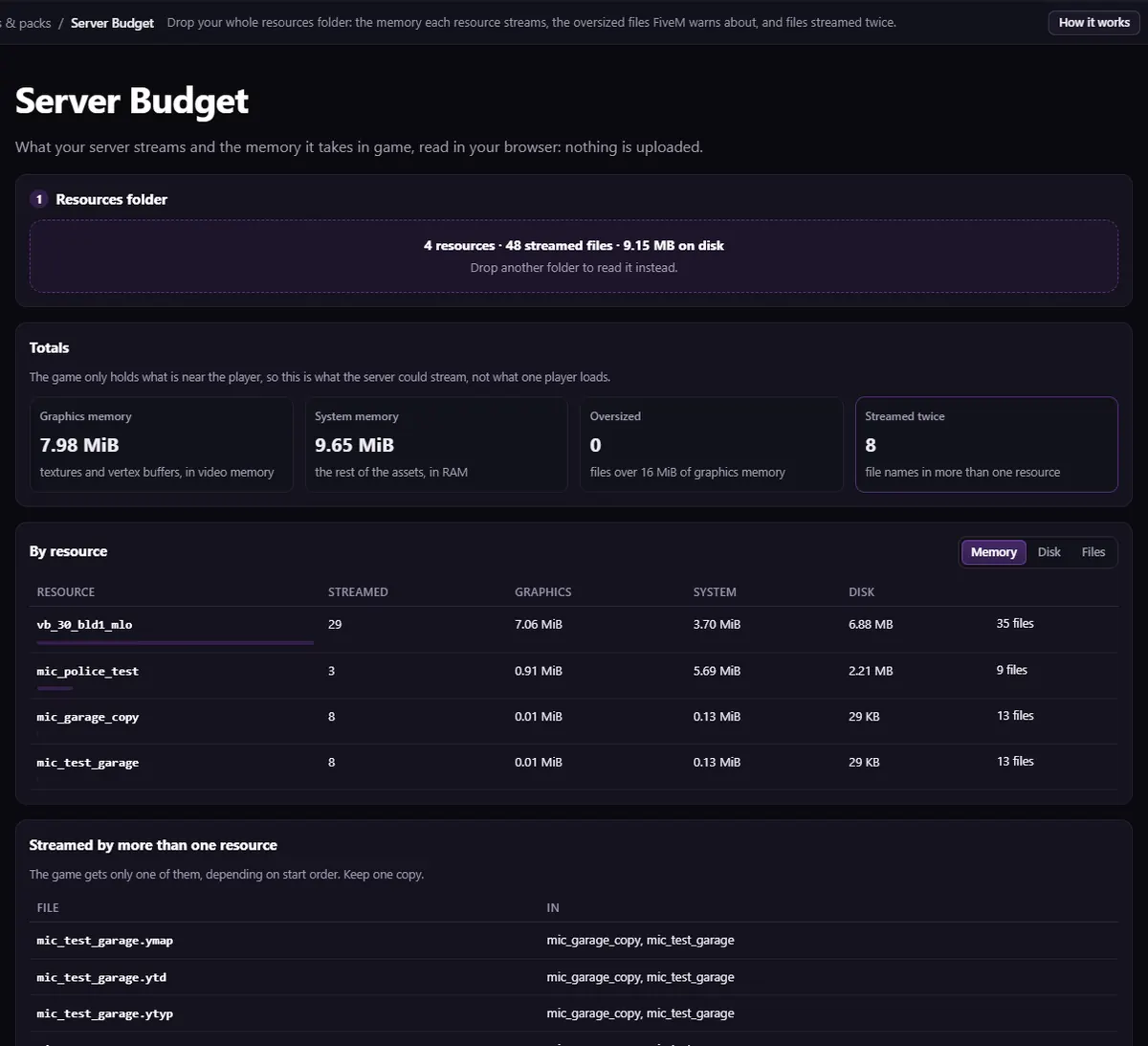
These totals are what the server could stream, not what one player loads at a time: a player only loads what is around them. They are the right list to work through all the same.
Step 2: shrink the oversized files
Drop the flagged stream files into the Asset Optimizer, set Largest texture size (1024, or 2048 for what players see up close), keep Add missing mipmaps ticked, and download the lighter files. They keep their names, so they go straight back into stream/.
Step 3: share repeated textures
For a pack that repeats the same textures in many dictionaries (clothing and car packs often do), Texture Dedupe finds the copies, moves them into one shared .ytd, and writes the gtxd.meta and the fxmanifest lines that make the models find them there. Only textures with the same name and the same pixels are moved.
Texture parents are read when a player joins. After changing them, players have to reconnect, or cars can show untextured until they do.
Step 4: check nothing went missing
Drop the changed resource into Missing Textures Check: every model should still find every texture. Then drop the folder into Server Budget again and compare.
The same fix, with Server Budget and the Asset Optimizer, is also a video tutorial.
Questions
- Can a single resource cause texture loss?
- Yes, if it is heavy enough: one car or clothing pack with 4K textures can stream a large share of everything your server sends. That is why Server Budget sorts resources by memory.
- Do I have to remove resources?
- Usually not. Shrinking oversized textures, removing files streamed twice and sharing repeated textures brings most servers down a long way while keeping everything.

The tool for this
Server Budget
Drop your resources folder: the memory each resource streams, the oversized files FiveM warns about, and the files streamed twice.
Open Server BudgetAlso useful here: Asset Optimizer · Texture Dedupe