Textures, files & packs · 3 min read
FiveM "oversized asset" warning: what it means and how to fix it
Read in: Español · Français · Deutsch · Português · Italiano · Polski · Türkçe · Русский
You start your server and the console fills with lines like this one:
Asset <resource>/<file>.ytd uses <size> MiB of physical memory.This is FiveM's oversized asset warning. It is not an error and the file still streams, but it tells you which files are heavy enough to cause trouble. Here is what it measures, why the file's size on disk tells you little, and how to bring those files down.
What FiveM measures
When the server starts, FiveM reads the header of every file in a resource's stream folder. That header says how much memory the file takes once loaded, in two parts: physical memory (graphics memory: textures and vertex buffers) and virtual memory (system memory: the rest of the asset). The thresholds, read in FiveM's own code, are the same for both:
| Memory of one file | What FiveM does |
|---|---|
| over 16 MiB | prints the warning |
| over 32 MiB | prints it in yellow |
| 48 MiB and over | adds: "Oversized assets can and WILL lead to streaming issues (such as models not loading/rendering)." |
| over 64 MiB | prints it in red |
The warning is per file. A 20 MiB .ytd is flagged even if the rest of your server is light.
Why the size on disk misleads
Streamed files are compressed on disk, and the warning counts what they take loaded. For a texture that is its size in the GPU format, with every mipmap level, rounded up to whole memory pages. A rough guide, before that rounding:
| Texture (with mipmaps) | DXT1 (no transparency) | DXT5 (with transparency) |
|---|---|---|
| 1024 × 1024 | 0.67 MiB | 1.33 MiB |
| 2048 × 2048 | 2.67 MiB | 5.33 MiB |
| 4096 × 4096 | 10.67 MiB | 21.33 MiB |
So a single 4096 × 4096 DXT5 texture is already over the line on its own, and a .ytd of a few 2048 textures can pass it while looking small in your file explorer. Page rounding can make the total noticeably more than the textures added up.
If a file is flagged for virtual (system) memory, it is not the textures: it is the asset's other data, such as its collision. Shrinking textures will not change that.
Find every oversized file at once
Rather than reading the console, drop your whole resources folder into Server Budget. It reads the same headers in your browser (nothing is uploaded) and lists:
- Oversized: the files over 16 MiB of graphics memory, worst first.
- By resource: what each resource streams, sorted by memory.
- Streamed twice: file names that more than one resource streams. The game gets only one of them, so keep one copy.
Server Budget's Oversized list counts graphics memory. A file the console flags only for virtual memory will not be in it.
Shrink the textures
Take the files Server Budget flags (.ytd, .ydr, .yft, .ydd) and drop them into the Asset Optimizer:
- Set Largest texture size. 1024 is the default; 2048 is a common choice for cars and liveries you look at up close.
- Keep Add missing mipmaps ticked: textures saved without them get them back.
- Check the estimate ("At 1024 px: about … less texture memory") and the file table.
- Click Download the lighter files (.zip). You get every file back under its own name: put them in place of the old ones.
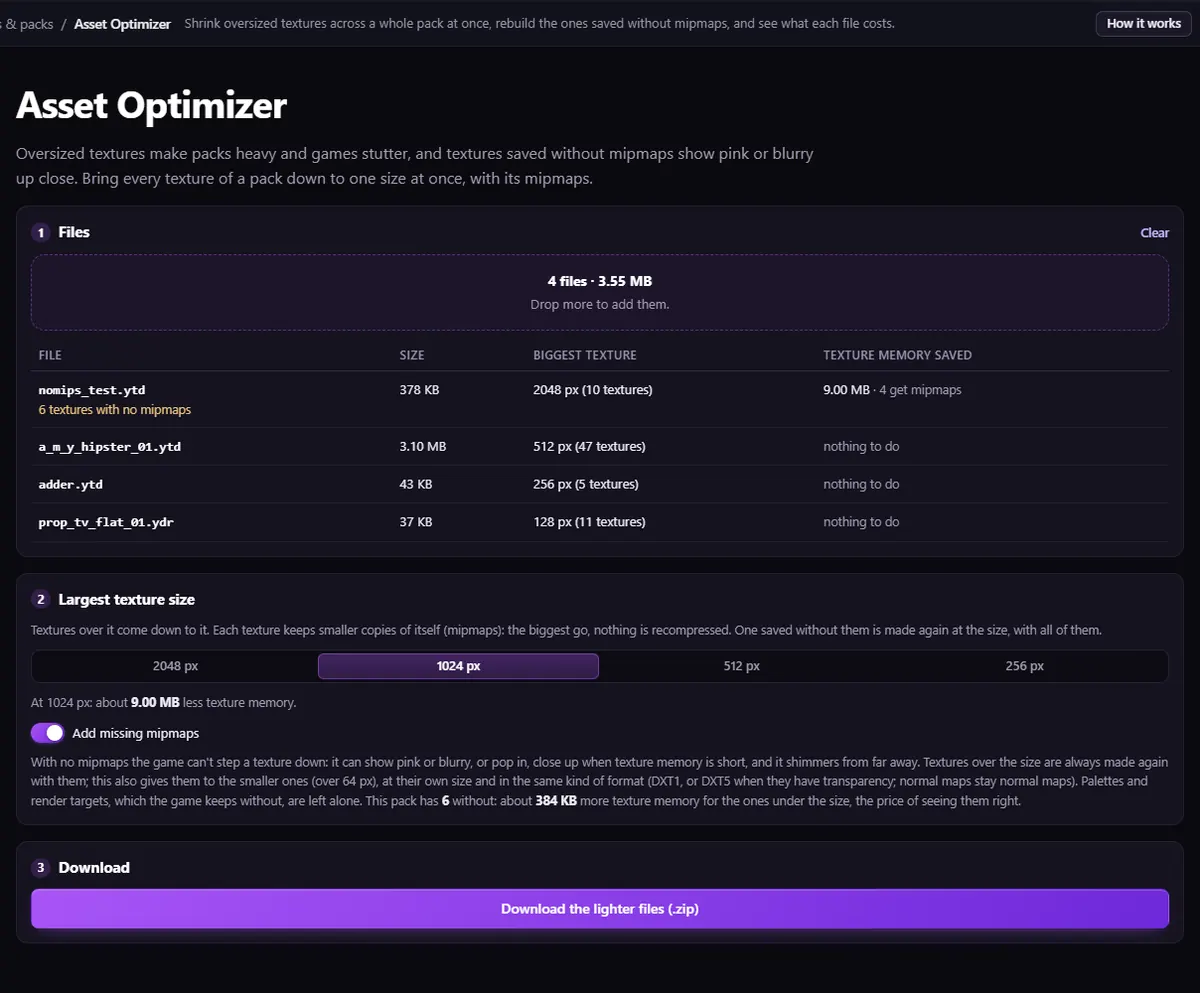
A texture that has mipmaps is shrunk by dropping its largest levels, with no recompression, so it looks exactly like it did from a little further away. A texture without mipmaps is rebuilt with all its levels, at the size you picked, or at its own size if it is smaller.
Packs that repeat the same texture in many dictionaries can also share it instead: Texture Dedupe moves repeated textures into one shared .ytd. Then drop the folder into Server Budget again to see the result.
Questions
- Is 16 MiB a hard limit?
- No. FiveM still streams the file and only warns. From 48 MiB its own warning says such assets will cause streaming issues, so treat everything over 16 MiB as a file to shrink.
- Does the warning count the size of the file on disk?
- No. It counts the memory the file takes once loaded, read from the file's header. A file can be well under 16 MB on disk and still be over 16 MiB loaded.
- Will smaller textures look worse?
- Up close, a 1024 texture is softer than a 2048 one. From a distance the game already draws the smaller mipmap levels, which are exactly what the Asset Optimizer keeps.
The tool for this
Server Budget
Drop your resources folder: graphics and system memory per resource, every file over 16 MiB, and every file streamed twice. In your browser, nothing uploaded.
Open Server BudgetAlso useful here: Asset Optimizer · Texture Dedupe