Textures, files & packs · 3 min read
How to add mipmaps to a YTD (textures pink or shimmering up close)
Read in: Español · Français · Deutsch · Português · Italiano · Polski · Türkçe · Русский
A texture usually comes with mipmaps: smaller copies of itself, each half the size of the one before. The game draws the full texture up close and the smaller copies further away, which is cheaper and looks smoother. Some exporters save textures with only their full-size level, and in FiveM that can show up as a model that is pink or blurry up close, or that shimmers from far away.
Why a texture without mipmaps causes trouble
Almost everything in the game has mipmaps. We went through 1,500 of GTA V's own .ytd files: of their 3,534 colour textures, only 65 have a single level, and only 2 of those are larger than 64 pixels, both vehicle badges. The textures the game keeps at one level are kept so on purpose: tint palettes, script render targets (script_rt_…), water maps, badges and some interface pictures.
A texture with no smaller levels gives the game no way to step it down. The likely result, when texture memory is short, is that it shows pink or blurry or pops in up close, and from far away it shimmers. That is what we saw on a customer's addon ped: pink up close in game, with every texture in place. Its body texture was a 2048 × 2048 DXT5 saved with a single level.
Mipmaps cost about a third more memory than the full-size level alone. That is the normal price, and the game's own textures all pay it.
Find the textures without mipmaps
Three tools list them, by the same rule (a single level, larger than 64 pixels, and not one of the kinds the game keeps at one level):
- Missing Textures Check: a whole resource; its Size and format section lists the textures without mipmaps.
- Asset Optimizer: the files you drop, with "N textures with no mipmaps" for each.
- Model Inspector: one model and its
.ytd, with a No mipmaps section.
Rebuild them with mipmaps
- Drop the
.ytdinto the Asset Optimizer, together with the models that use it (.ydr,.yft,.ydd). With the models there, normal maps are recognised by how the models use them. - Keep Add missing mipmaps ticked (it is on by default).
- Pick a Largest texture size. Textures above it are brought down to that size; the others keep their size (rounded to a power of two) and just get their mipmaps.
- Click Download the lighter files (.zip) and put the files back in
stream/under the same names. - Read What was done to each texture: one line per texture, with its size and format before and after.
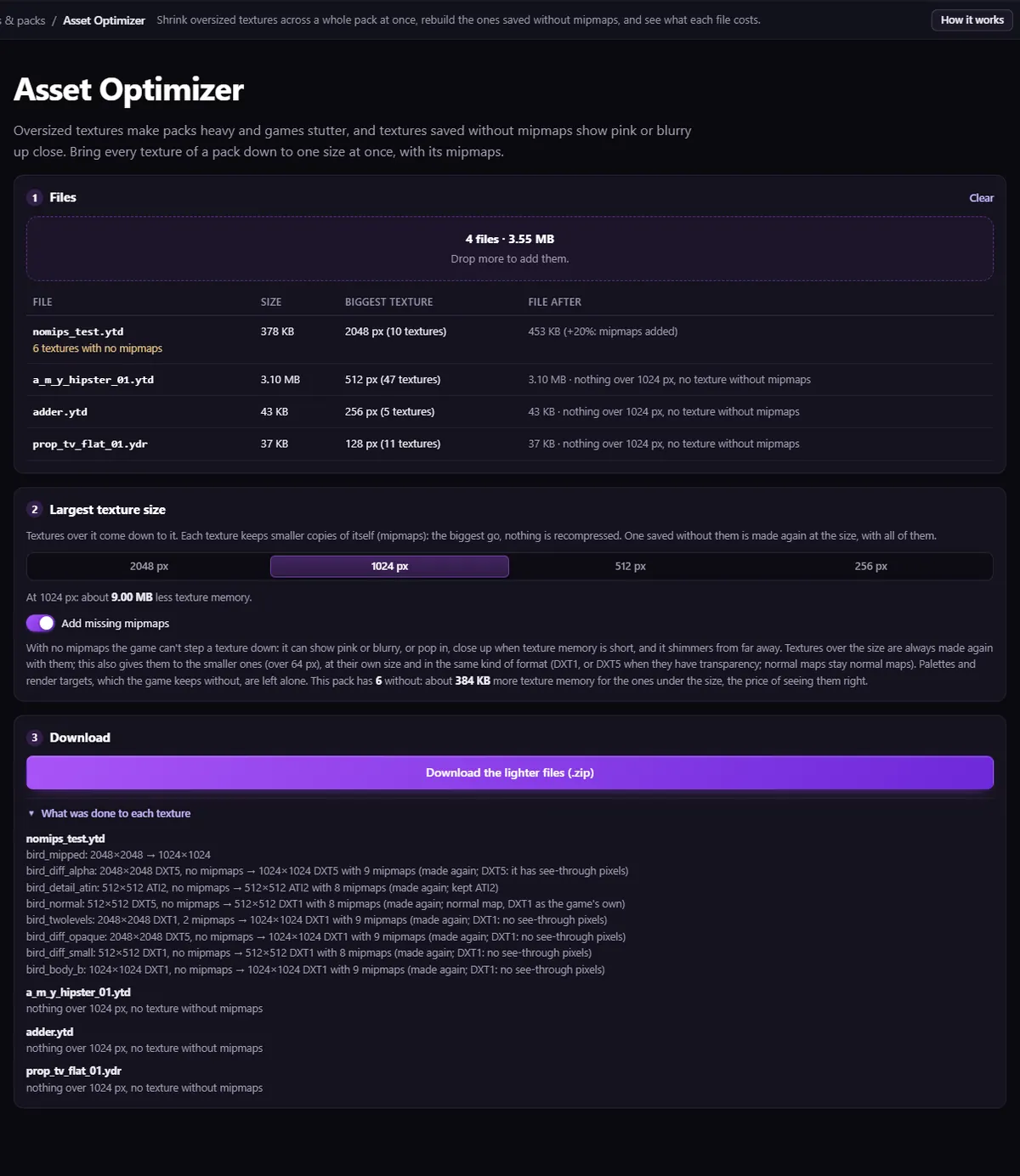
.ytd with six textures saved without mipmaps, after the run: each one made again with its levels.Each rebuilt texture gets every level down to 4 pixels. Compressed colour textures become DXT1 when no pixel is see-through and DXT5 when some are (uncompressed ones stay uncompressed); normal maps are kept as normal maps, made unit length again at every level. Palettes, render targets and the other one-level kinds are left alone, and formats the tool cannot rebuild (BC7, for one) are left as they are, with a note.
The Texture Editor is not the tool for this: it shrinks and replaces textures, but it does not add mipmaps to a texture you leave as it is. A texture you replace there does come back with mipmaps.
Check it in game
Players keep the old .ytd until they reconnect, so rejoin the server rather than only restarting the resource. Then look at the model up close and from a distance.
Questions
- Should every texture have mipmaps?
- Nearly every one in GTA V does. The exceptions are textures the game keeps at one level on purpose (tint palettes, script render targets, water maps), and the tools leave those alone.
- Do mipmaps make my files bigger?
- By about a third. If that pushes a file over FiveM's 16 MiB warning, lower the largest texture size at the same time.
The tool for this
Asset Optimizer
Drop your stream files: the textures without mipmaps get them back, oversized ones are brought down to the size you pick, and every file keeps its name.
Open Asset OptimizerAlso useful here: Missing Textures Check · Model Inspector