Vehicles · 3 min read
FiveM sirens or lights wrong? How to fix siren ID conflicts
Read in: Español · Français · Deutsch · Português · Italiano · Polski · Türkçe · Русский
You add a new police car and an older one starts flashing its pattern. Or a car's tuning menu goes empty, or its headlights change colour. Each vehicle pack defines its sirens, lights and mod kits by number, in its carcols.meta, and two packs that pick the same number overwrite each other: the last one loaded wins.
Where the numbers are
A pack's carcols.meta defines siren settings, light settings and mod kits, each with an id. Its carvariations.meta says which ones each car uses. If two packs both define siren 101, every car that asks for 101 gets whichever was loaded last.
Why a big number does not save you
Picking a large id "to be safe" is common advice, and it backfires. In the game's file format, siren and light ids are a single byte, so they only go up to 255, and a reader that keeps the low byte (CodeWalker does) turns a larger number into what is left over: siren 300 becomes 44, light 1237 becomes 213. That can land right on one of the game's own (the game uses sirens 0 to 20 and lights up to 217), or on another pack's. Mod kits have more room (16 bits).
| Kind | Ids you can use | Reserved |
|---|---|---|
| Siren settings | 1 to 254 | 0 means no sirens, 255 none |
| Light settings | 0 to 254 | 255 |
| Mod kits | up to 65,534 | 65,535 |
Find and fix the clashes
Drop your whole resources folder, or the packs' carcols.meta and carvariations.meta files, into Siren ID Check. It runs in your browser: nothing is uploaded, and it is free (you sign in with Discord).
- Read the three tables, Siren settings, Mod kits and Light settings: each id with the file that defines it and what is wrong with it ("over 255: the game reads it as …", "overwrites the game's…", "same id as…").
- Each clash gets a free id in Move to. The first file keeps its id; later ones move. The cars of the same pack follow their siren or light to its new id in
carvariations.meta. Mod kits are named by their kit name, so a kit can move without changing the cars. - Under Fixed files, untick any change you do not want (a pack that replaces one of the game's sirens on purpose).
- Download all N files (.zip) (or the one fixed file) and put each one back in its pack.
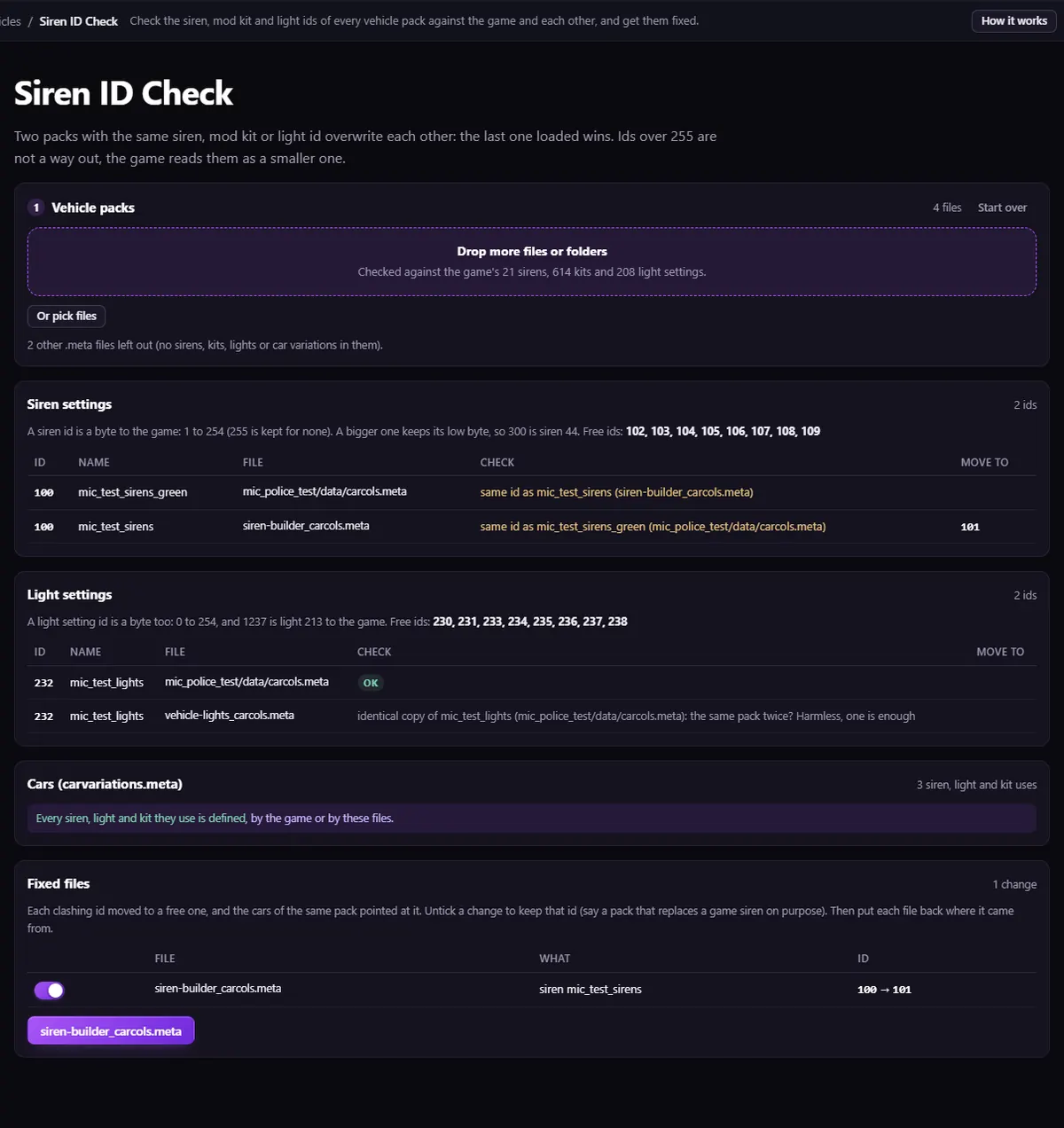
An identical copy of the same file (the same pack installed twice) is marked as harmless. A car whose id is defined by more than one pack, none clearly its own, is left for you to set by hand.
Stop it happening again
If you keep many car packs, merging them into one resource fixes the ids once and for all, along with spawn names, handlings and textures: how to merge FiveM car packs. To make a new pattern instead, the Sirens Builder builds one light by light and writes its carcols.meta with a free id.
Questions
- Is this the same as ELS?
- No. This is the game's own siren system, set in
carcols.meta. ELS and similar scripts drive the lights their own way. - Do I need to restart the server?
- Yes, after putting the fixed files back, so every pack is loaded again with its new ids.
The tool for this
Siren ID Check
Drop your resources folder: every siren, light and mod kit id checked against the game and each other, with the clashes moved to free ids.
Open Siren ID CheckAlso useful here: Vehicle Pack Merger · Sirens Builder