Vehicles · 3 min read
How to merge FiveM car packs into one resource (without breaking them)
Read in: Español · Français · Deutsch · Português · Italiano · Polski · Türkçe · Русский
Fifty car resources means fifty folders to keep up to date, and merging them into one pack is a popular way to tidy a server. Done by copying files into one stream folder and pasting the metas together, it is also a popular way to break cars: tuning menus go empty, sirens swap, a car spawns as another.
What clashes when you merge by hand
- File names. FiveM streams by file name, so two packs with a
.ytdor a tuning part of the same name: only one of them loads. - Spawn names. Two cars with the same model name: one of them is gone.
- Siren, light and mod kit ids. Two packs with the same id overwrite each other (why, and what ids over 255 do).
- Kit names. A pack that defines
0_default_modkitchanges every game car that uses it. - Handling and layout names, which must be unique in the whole merged pack.
- Display names. A
gameNameis at most 11 characters, and one that copies a game car's label shows the game car's name. - Big texture dictionaries. One
.ytdover 16 MiB of memory is what FiveM's oversized asset warning is about.
Merge them step by step
Open the Vehicle Pack Merger and drop your car resources: their folders or .zip files, several at once, or a parent folder such as [cars]. Each folder with an fxmanifest is one pack. Everything runs in your browser except splitting a .ytd over 16 MiB.
- Order the packs. The first keeps its ids and names; a later one that clashes with it is the one changed.
- Read Check these and What was fixed: every change, by kind (sirens, lights and kits; names; files; copies).
- Edit the Vehicles list: each car's name, brand, category and price for the shop lists.
- Name the resource and click Download.
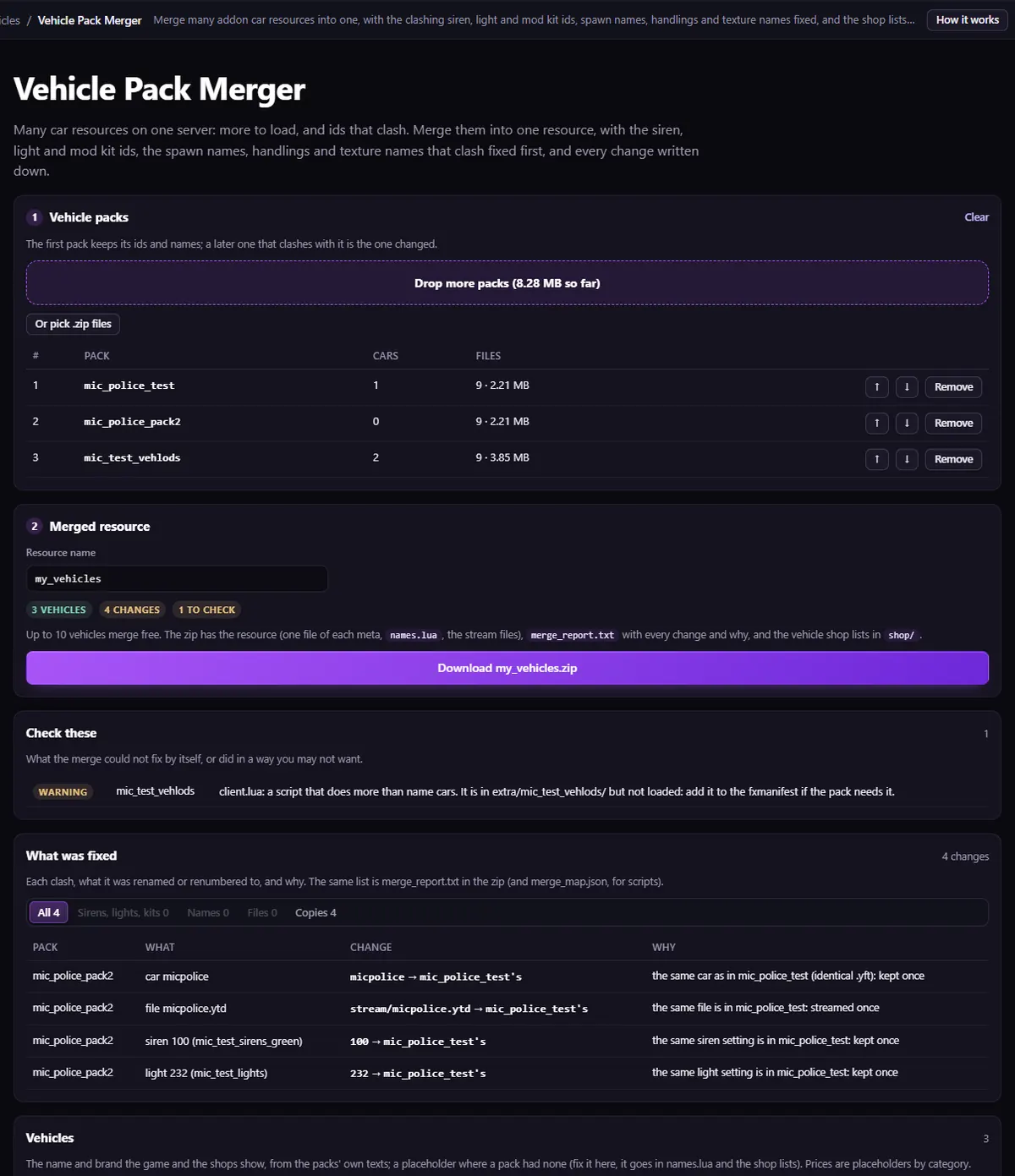
What it fixes, specifically: a car twice with the same file is kept once, and a different car with the same name becomes <name>_2 with its files; clashing stream files that a meta names (a .ytd, a tuning part, a clip) are renamed along with what points at them, and other clashing ones are left out with a warning; siren, light and kit ids move to free ones; kit, handling and layout names are made unique; repeated, empty or too long display names get a new label; a .ytd over 16 MiB is split into parts linked to each other, every texture kept as it was (not a +hi.ytd, nor a single texture over 16 MiB on its own).
What you get
One resource: one vehicles.meta, handling.meta, carcols.meta, carvariations.meta, vehiclelayouts.meta and dlctext.meta, each pack's files in stream/<pack>/, the fxmanifest with its data_file lines in order, a names.lua for the display names, and a merge_report.txt with every change. Plus shop lists for qb-core, Qbox, ESX (SQL) and JG Garages. Their prices are placeholders by vehicle class: set your own.
Stop the old packs, ensure the merged one, and drop it into Vehicle Pack Check for a last look.
Limits
- Escrowed packs cannot be merged.
- Scripts beyond naming the cars are copied to
extra/but not loaded; sound banks are carried as they are. - Up to 10 cars merge free; up to 50 with the Creator plan, more with Studio.
Questions
- My tuning stopped working after a merge. Why?
- Two packs used the same mod kit id or kit name, so one car's kit overwrote the other's. The merger moves clashing kits to free ids and names.
- Are my cars uploaded?
- No. The merge happens in your browser; only a
.ytdover 16 MiB is sent to be split.
The tool for this
Vehicle Pack Merger
Drop your car packs: one resource comes out, with the clashing ids, spawn names, handlings and texture names fixed, and shop lists for your framework.
Open Vehicle Pack MergerAlso useful here: Siren ID Check · Vehicle Pack Check