Vehicles · 3 min read
FiveM addon car not spawning? The usual mistakes and how to find them
Read in: Español · Français · Deutsch · Português · Italiano · Polski · Türkçe · Русский
You added a car, restarted, typed its spawn name, and nothing. Or it spawns without textures, or drives exactly like another car. An addon car is a handful of files that must point at each other by name, and one wrong name is enough.
What an addon car is made of
stream/: the model (<name>.yft, and<name>_hi.yftfor up close) and its textures (<name>.ytd).- The metas:
vehicles.meta(the car itself),handling.meta,carvariations.meta(colours, kits, liveries) and oftencarcols.meta(sirens, lights, mod kits). - The fxmanifest, which lists the metas in
filesand loads each with itsdata_fileline.
files {
  'data/vehicles.meta',
  'data/handling.meta',
  'data/carvariations.meta',
}

data_file 'HANDLING_FILE' 'data/handling.meta'
data_file 'VEHICLE_METADATA_FILE' 'data/vehicles.meta'
data_file 'VEHICLE_VARIATION_FILE' 'data/carvariations.meta'
The usual mistakes
- No fxmanifest.lua (nor an old
__resource.lua, or it is still named.off): FiveM does not load the folder at all. - A
data_fileline pointing at a file that is not there, or a meta in the folder that nodata_fileloads. - No
files { }block: the metas must be listed in it, or players may never get them. modelNamethat does not match the.yft. The spawn name is the model name; a file called differently is never found.txdNamethat does not match the.ytd: the car shows up untextured.handlingIdthat is in nohandling.meta, neither the pack's nor the game's.- A siren id or mod kit name in
carvariations.metathat nothing defines: no sirens, or no tuning parts. - Two files with the same name in the stream folder: only one of them is used.
Names longer than 11 characters are another trap: the game cuts a gameName there, and some scripts do the same with the model name.
Find it in seconds
Drop the car's resource folder into Vehicle Pack Check. It runs in your browser (nothing is uploaded) and checks all of the above against the game's own handlings, sirens and mod kits, then lists what it found, errors first: "No fxmanifest.lua", "<model>.yft is not in the folder", "Its textures, <txd>.ytd, are not in the folder", "handlingId X is in no handling.meta here or in the game"…
Errors stop a car from loading or working: fix them first. Warnings are things that work but look wrong, such as a missing _hi.yft (the car uses its normal model up close) or a streamed file over 16 MB.
Only have the .yft and .ytd?
If the car came as a loose .yft and .ytd with no metas, Vehicle Addon Builder writes them. Drop the model, pick the closest game car as its template (suggested by size, wheels and kind), set its spawn name (up to 11 characters) and the name shown in game, adjust mass, speed, braking and grip if you want, and download a ready resource with the metas, the data_file lines and a README. It also checks the model: no seat for the driver, no collision, invisible wheels.
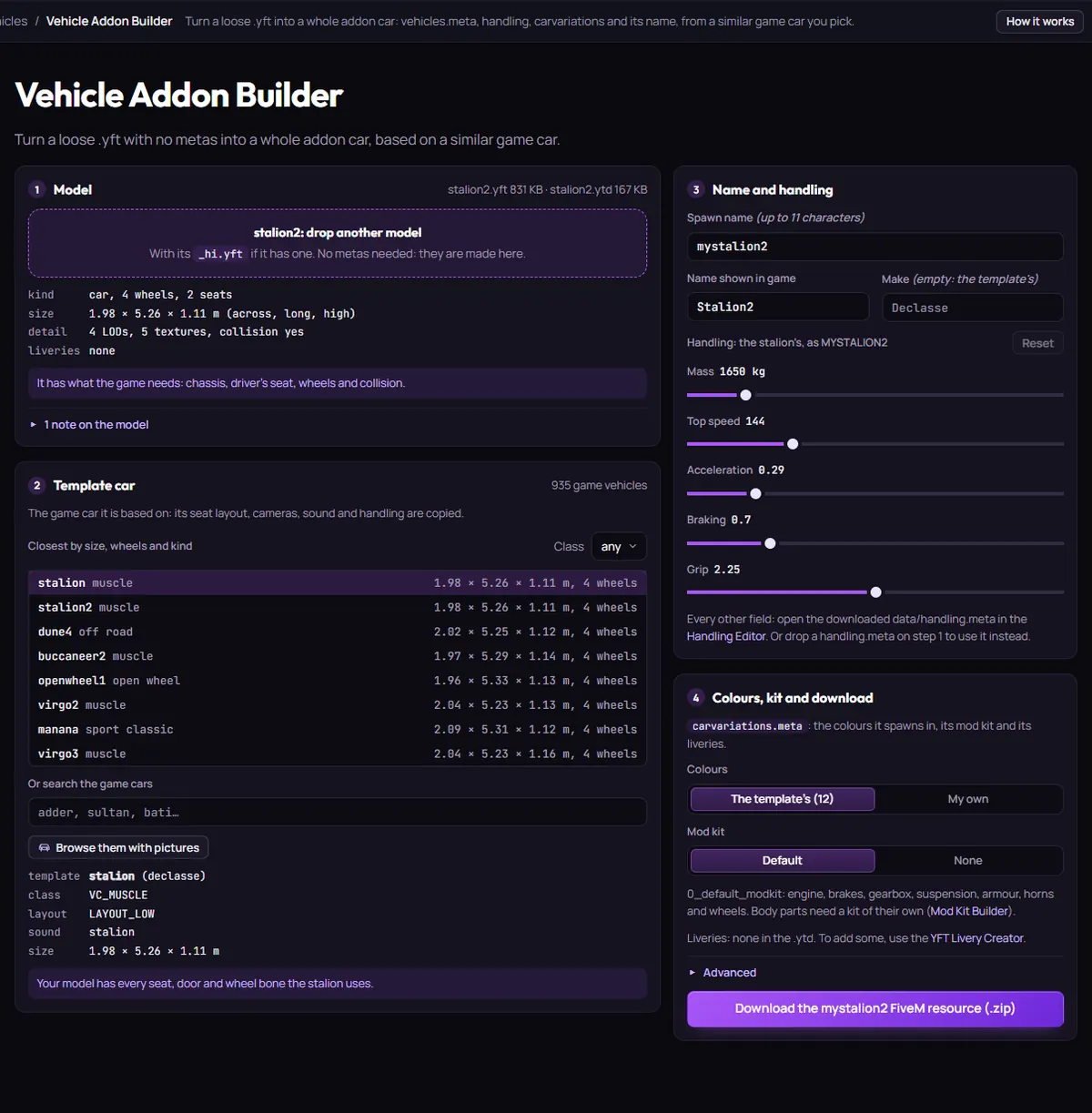
Then ensure it, restart, and spawn it by its spawn name (with your framework's command, such as /car <name> on ESX, or txAdmin).
Questions
- It spawns but has no textures. Why?
- Its
txdNameinvehicles.metadoes not match a.ytdin the stream folder. For parts that stay white, see why FiveM textures are white or purple. - Do I need carcols.meta?
- Only for sirens, lights or mod kits of the car's own. Without one, the car uses what its
carvariations.metapoints at.
The tool for this
Vehicle Pack Check
Drop your vehicle resource folder: missing metas, wrong names and stream mistakes, errors first, with what to fix.
Open Vehicle Pack CheckAlso useful here: Vehicle Addon Builder